
How to Install STZ Player and Watch IPTV – Complete Setup Guide (2026)
Looking for the Best IPTV Service for STZ Player?
If you already use STZ Player or you’re planning to install it, you’ll need a reliable IPTV provider to unlock thousands of live TV channels, premium sports, movies, and TV series.
🎁 New Customers Get 15% OFF Their First IPTV Subscription
👉 Start Your Premium IPTV Subscription Today with KechtyTV
What is STZ Player?
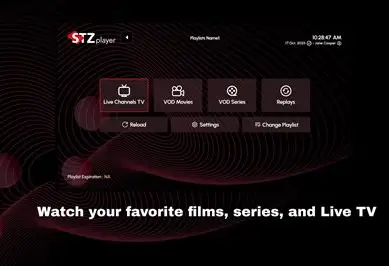
STZ Player is a modern IPTV media player designed to stream live television channels, movies, TV shows, and video-on-demand content using IPTV credentials supplied by an IPTV provider.
Unlike streaming services such as Netflix or Disney+, STZ Play-er does not include its own content. Instead, it acts as a professional IPTV player that connects to your IPTV subscription using Xtream Codes API, M3U Playlist, or other supported login methods.
Its clean interface, fast loading speed, and compatibility with multiple devices have made it one of the preferred IPTV applications for users looking for a smooth streaming experience.
Whether you want to watch live sports, international channels, premium entertainment, or 4K movies, STZ Player offers an excellent viewing experience when paired with a high-quality IPTV service like KechtyTV.
Why Choose STZ Player for IPTV?
STZ Player provides several features that make it an excellent choice for IPTV users.
Fast Streaming
The application loads channels quickly and minimizes buffering when used with high-quality IPTV servers.
Easy Navigation
Its intuitive interface allows users to browse channels, categories, and VOD libraries with ease.
Multi-Device Support
STZ Player works on:
- Android TV
- Android Phones
- Smart TVs
- Fire TV Stick
- Fire TV Cube
- Windows
- macOS
- Tablets
Xtream Codes Support
Most IPTV providers—including KechtyTV—support Xtream Codes login, making setup simple.
STZ Player Requirements
Before installing STZ Player, make sure you have:
- Stable Internet Connection (25 Mbps or higher recommended)
- Active IPTV Subscription
- STZ Player App
- Xtream Codes Login or M3U Playlist
- Smart TV, Android Device, Firestick, or PC
How to Install STZ Player on Android
Installing STZ Player on Android takes only a few minutes.
Step 1
Open Google Play Store.
Step 2
Search for:
STZ Player
Step 3
Download and install the application.
Step 4
Launch STZ Player.
Step 5
Choose Xtream Codes Login.
Step 6
Enter the IPTV details provided by KechtyTV:
- Server URL
- Username
- Password
Step 7
Click Login.
The application will automatically download:
- Live TV
- Movies
- Series
- EPG
Your IPTV service is now ready.
- How to Install STZ Player on Firestick
- How to Install on Smart TV
- Windows Installation
- iPhone & iPad
- Login with Xtream Codes
- Login with M3U
- Watching IPTV
- Best IPTV Settings
- Buffering Fixes
- Common Errors
- VPN Guide
- IPTV SMARTERS PLAYER
How to Watch IPTV on STZ Player
Once ST Z Player is installed and connected to your IPTV subscription, enjoying live television and on-demand entertainment becomes incredibly simple. The application is designed with a modern and intuitive interface that allows users to access thousands of live TV channels, movies, TV series, and sports events in just a few clicks. After logging in with your Xtream Codes API or M3U playlist, S TZ Player automatically downloads your IPTV content, including channel categories, electronic program guide (EPG), video-on-demand libraries, and series collections. Everything is organized into easy-to-navigate sections, making it simple to find your favorite content. Whether you want to watch international news, premium sports, children’s programming, documentaries, or blockbuster movies, ST Z Player provides a smooth and responsive viewing experience. One of the biggest advantages of using ST Z Player is its compatibility with high-quality IPTV providers like KechtyTV. A reliable IPTV subscription ensures that channels load quickly, streams remain stable, and buffering is kept to a minimum. With KechtyTV, users can access more than 30,000 live TV channels and over 150,000 movies and TV series in HD, Full HD, and stunning 4K quality. Simply select a category from the navigation menu, choose the channel or movie you want to watch, and press play. If your IPTV provider supports catch-up TV and cloud-based EPG, ST Z Player also allows you to browse upcoming programs and revisit previously aired content. Users can create favorite channel lists, search for specific movies or TV shows, and switch between categories without interrupting playback. The built-in media player supports multiple video formats and adaptive streaming technologies that automatically adjust the video quality based on your internet speed. For the best viewing experience, a stable broadband connection of at least 25 Mbps is recommended for HD content, while 50 Mbps or higher is ideal for Ultra HD and 4K streaming. ST Z Player works flawlessly on Android devices, Smart TVs, Firestick, Android TV Boxes, Windows PCs, tablets, and other compatible devices, allowing you to enjoy the same IPTV subscription wherever you are. Whether you’re watching live football, UFC, Formula 1, NBA, NHL, Netflix-style VOD content, or international television channels, STZ Player transforms your device into a complete entertainment hub. Combined with the premium servers, anti-freeze technology, and instant activation offered by KechtyTV, the application delivers an exceptional IPTV experience suitable for both beginners and advanced users.
Why KechtyTV Is the Best IPTV Service for STZ Player
Choosing the right IPTV provider is just as important as selecting the right IPTV player. While STZ Player offers an excellent platform for streaming live television and video-on-demand content, the overall quality of your viewing experience depends entirely on the IPTV service you connect to the application. This is where KechtyTV stands out from the competition. Our premium IPTV service has been specifically optimized to work seamlessly with STZ Player, providing fast channel loading, stable connections, and exceptional image quality across every supported device. Instead of dealing with unreliable servers, constant buffering, or broken channels, KechtyTV delivers a professional IPTV experience powered by high-performance infrastructure and advanced anti-freeze technology. Subscribers gain instant access to more than 30,000 live television channels from around the world, including premium sports, entertainment, news, children’s programming, documentaries, and international content. In addition, our extensive video-on-demand library includes over 150,000 movies and TV series that are updated regularly with the latest releases. Every subscription supports HD, Full HD, and Ultra HD 4K streaming, allowing users to enjoy crystal-clear picture quality on Smart TVs, Android devices, Firestick, Windows PCs, Apple devices, and many other platforms compatible with STZ Player. KechtyTV also offers flexible subscription plans designed to suit every budget, whether you need a one-month plan or a long-term annual subscription. New customers can take advantage of our 24-hour free IPTV trial to test the complete service before making a purchase. This allows you to evaluate channel quality, streaming stability, VOD performance, EPG functionality, and overall compatibility with STZ Player without any risk. Once you’re satisfied, upgrading is quick and simple, with subscription plans starting at just $15 per month. As an added bonus, all new customers receive an exclusive 15% discount on their first order. Our dedicated customer support team is available to help with installation, activation, troubleshooting, and configuration whenever needed, ensuring that even first-time IPTV users can get started within minutes. Whether your goal is to watch live Premier League football, UFC events, Formula 1 races, NBA games, international television, or the latest Hollywood movies, KechtyTV provides the speed, reliability, and premium streaming quality needed to get the most out of STZ Player. If you’re searching for the best IPTV for STZ Player, KechtyTV is the complete solution, combining premium content, outstanding performance, affordable pricing, and reliable customer support into one powerful IPTV subscription.