
IBO Player Setup Guide – How to Install & Activate IBO Player on Any Device
FOR MORE EXPLICATION CONTACT US IN WHATSAPP
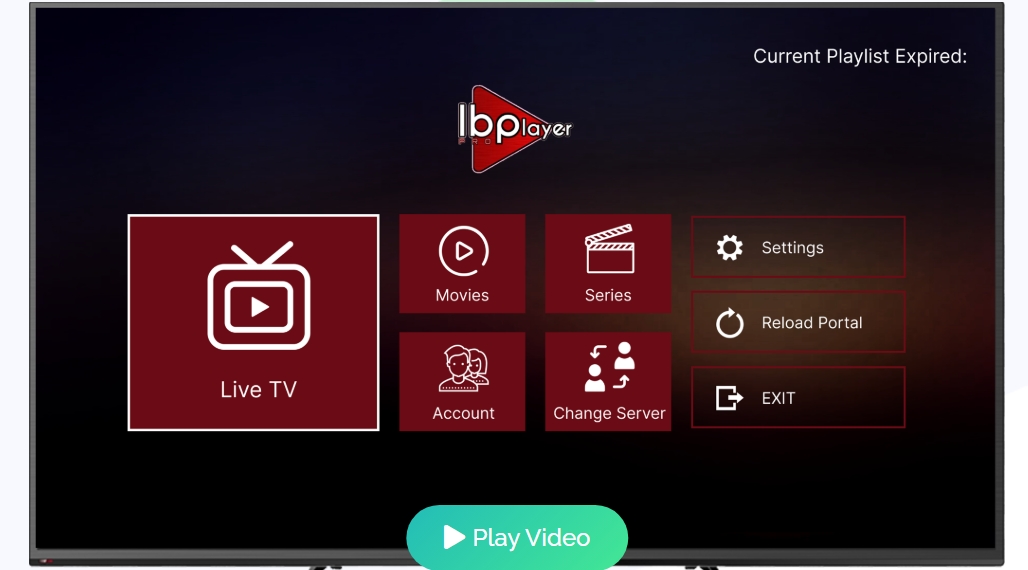
The ibo player pro app brings a professional media player experience to Android smart TVs, sticks, phones, tablets, and select Samsung sets. Use downloader code 481220 to install the APK on Android and Amazon Fire TV in minutes.
ORDER NOW YOUR IPTV SUBSCRIPTION KECHTY TV
This guide walks you through quick setup steps and activation. New users get a 7-day trial to test streaming, video quality, and the interface before committing.
The software supports all screen resolutions, including 4K, and handles diverse media formats for smooth playback. It also offers a clean interface to access channels and media libraries worldwide.
We include a short URL for Samsung TV downloads and clear tips to integrate these digital products into your home entertainment system. Follow along to ensure your device is ready for reliable streaming with this pro-level iptv player.
Key Takeaways
- Use downloader code 481220 for quick installation on Android and Fire TV.
- Free 7-day trial lets you evaluate streaming and video features.
- Supports Android smart TVs, sticks, phones, tablets, and Samsung TV installs.
- Handles 4K and multiple media formats for high-quality entertainment.
- Provides a simple interface to access global channels and media libraries.
Understanding the IBO PLAYER Experience
Start enjoying a clean, fast interface that puts your video library front and center. The app blends a simple UI with advanced M3U controls for smooth navigation and quick access to playlists.
The platform acts as a modern media player that shows movie posters, trailers, and rich information for series and films. This visual context helps you decide what to watch faster.
Support for VLC and fast streaming boosts playback quality across devices. A professional IPTV player setup keeps your channel list organized and easy to search.
- Quick navigation: minimal steps to reach your list and playlist items.
- Rich metadata: trailers and posters add useful information while browsing.
- Playback options: VLC compatibility and M3U support for reliable streaming.
Remember, the software provides tools only; users supply content and are responsible for its legality. Overall, this player pro design suits casual viewers and power users who want efficient entertainment management.
Key Features and Streaming Capabilities
This release focuses on visual fidelity and granular media controls for reliable home entertainment.
4K streaming support ensures ultra-high-definition content displays with crisp detail on compatible screens. Fast streaming and VLC integration reduce buffering and keep picture quality stable during peak hours.
4K Streaming Support
High-resolution playback covers all screen sizes and delivers the full effect of HDR-capable TVs. The app adapts bitrates to maintain smooth video without frequent drops.
Advanced Media Controls
Advanced M3U controls let you switch audio tracks and subtitles quickly. You also get metadata like release dates, actor info, trailers, and ratings to pick the right movies or series fast.
- Custom playback: toggle subtitles and audio tracks per title.
- Organize content: manage channels and movies with a clean interface.
- Parental control: restrict access to sensitive material for family safety.
- M3U support: flexible playlist control for fast access to entertainment.
| Feature | Benefit | Use Case | Notes |
|---|---|---|---|
| 4K Streaming | Maximum clarity on large screens | Watching films on a 4K TV | Adaptive bitrate minimizes lag |
| VLC Integration | Stable playback under load | High-traffic live streams | Reduces buffering events |
| M3U Controls | Precise playlist control | Custom channel lists and libraries | Supports subtitles and audio toggles |
| Metadata & Ratings | Better discovery and choices | Browsing movies and series | Shows actors, dates, and trailers |
Supported Devices and Operating Systems
A wide range of hardware and OS options ensures you can stream on most current devices. The software supports Android smart TVs, Android sticks, smartphones, tablets, and Apple TV models.
For Apple devices, the app requires iOS 15.6 or later and about 119.7 MB of free storage for installation. This keeps downloads quick and saves space on mobile devices.
The platform is also available on ZEASN/Whale OS, expanding compatibility to additional smart television brands. Installers tailor the setup to each device so the interface and playback use the device’s native strengths.
- Cross-device stability: consistent performance across major operating systems.
- Compact install: 119.7 MB footprint minimizes storage impact.
- Optimized setup: device-specific installation steps for best results.
Whether you juggle multiple boxes or a single set-top box, this player keeps your home entertainment seamless and reliable.
How to Install IBO PLAYER on Your Hardware
Get your device ready: follow these quick steps to install the app and start streaming in minutes.
Android and Fire TV Setup
Android and Fire TV
To install the ibo player pro on Android or Fire TV, open the downloader and enter code 481220 to fetch the official APK.
Allow installations from unknown sources if prompted, then run the installer and remove any older app versions first to avoid conflicts.
Samsung TV Installation
Visit the specific URL on the official website to download the Samsung-compatible version. Use the provided link and follow on-screen instructions to complete setup.
Desktop Configuration
Desktop users can get the media player installer from the support portal. Download the correct package for your OS and follow the installer prompts.
- Always check the app version to benefit from better streaming stability.
- The M3U install is straightforward and gets your media lists working quickly.
- The player pro interface adapts to each screen so video looks good on TV and desktop.
Activating Your Account for Full Access
Visit the official website to upload your playlist and finish activation. This is the main way to link your subscription and enable full access to the service.
Activation also works from inside the app via an in-app purchase if you prefer a faster route. Both methods require the same credentials from your TV provider.
Make sure you have a valid username, password, and server URL. Those details come from your TV service provider and are necessary for the account to function correctly.
- Why activate: unlocking pro features and secure streaming for your entertainment.
- Manage online: use the website to edit subscription details and sync playlists.
- Quick purchase: in-app purchases let users enable premium services without leaving the app.
- Support ready: our team can help with playlist upload and activation issues.
Once activated, the ibo player syncs your playlist and starts pulling channels. A valid account keeps sessions secure and helps the player pro run smoothly.
Managing Your Playlists and Content
Keep the shows and movies you love at the top of your list for instant access. Use simple tools to build custom categories and speed up navigation across channels and libraries.
Adding Favorites and Customizing Categories
Users can add channels, movies, and series to a favorites list so frequently watched items appear on the home screen. This saves time and reduces steps when starting a session.
The app supports languages and subtitle tracks for movies and series. Choose preferred audio and captions to improve the viewing experience on any screen.
“Organize once and enjoy faster access every time you open the app.”
- Organize playlists into custom categories for cleaner browsing.
- Hide or remove content you don’t want to see in your list.
- M3U support merges diverse video sources into one unified media library.
- Detailed information — release dates and actor info — helps pick what to watch.
Performance: the system handles large playlists smoothly so users don’t face slowdowns as their collection grows.
Parental Controls and Privacy Settings
Keep your family viewing safe by using built-in restrictions and simple account locks. The app offers clear parental controls that limit access to specific movies and series by rating or category.
ORDER NOW YOUR IPTV SUBSCRIPTION KECHTY TV
You can enable a password-based control setting to protect playlists. This prevents other household members from opening restricted lists or changing sensitive content.
Privacy settings let you manage how your data and content appear. Adjust visibility to hide categories or select languages you don’t want shown in the feed.
- Easy setup: turn restrictions on or off from the settings menu in seconds.
- Playlist protection: lock private lists with a secure passcode.
- Content filters: block age-inappropriate titles and hide unwanted categories.
Review the privacy policy to learn how the app handles your information. Regularly checking this policy helps you keep control of your digital footprint and media library.
ORDER NOW YOUR IPTV SUBSCRIPTION KECHTY TV
“Family-friendly features make the app a safe hub for shared screens.”
Troubleshooting Common Connection Issues
When streams cut out or channels fail to load, a quick checklist often restores service. Start with the basics and work through account and network steps. Most fixes take minutes.
Resolving Authentication Failures
Verify your credentials and the M3U playlist URL. Mistyped server addresses or wrong account details cause login errors. Re-enter the username, password, and URL exactly as provided by the service.
If the playlist still fails, try the reload option in settings to refresh the list. This can fix missing channels or an empty favorites list without reinstalling the app.
Improving Playback Stability
Check your internet speed first. A slow or unstable connection usually causes buffering and black screens. Restart your router and test again.
Keep the player pro app updated to the latest version. Patches often fix known connection and video issues.
- Use the control panel to adjust connection settings for smoother streaming.
- If a black screen appears, confirm the playlist is active and the service is online.
- Contact support if problems persist; they can test your account and server status.
| Issue | Quick Fix | When to Contact Support |
|---|---|---|
| Authentication error | Re-enter M3U URL and credentials; use reload option | Credentials valid but still blocked |
| Buffering or lag | Test internet speed; restart router; update app version | Speed OK but streams still unstable |
| Favorites/list not loading | Use reload setting; clear cache | List missing items after reload |
Privacy is respected while troubleshooting. Any diagnostic data follows the published policy and helps support resolve issues faster.
Conclusion
To conclude, the guide helps you install, activate, and secure a pro-grade media experience. This fast recap shows how the ibo player works as a reliable media player for home use.
Follow the install and activation steps to link your account and load an M3U playlist. The app supports 4K, robust playback, and parental controls to protect family viewing.
With tidy metadata, easy navigation, and solid streaming features, the ibo player pro makes browsing movies and video libraries straightforward. Keep credentials safe and review the privacy policy on the official website for the latest information.
Thanks for choosing this solution—use the guide and support links to get the most from the service.